Why Is My Website Not Appearing in ChatGPT Search? 12 Things to Check

SEO Specialist
- OpenAI says sites that block OAI-SearchBot will not be shown in ChatGPT search answers.
- GPTBot is for training and ChatGPT-User is for user-requested visits. Neither controls search inclusion.
- Robots.txt changes for ChatGPT search take about 24 hours to apply.
- ChatGPT pulls results from its own index plus outside providers, so being indexed in Google and Bing still matters.
- Fix access first, then content structure, then authority.
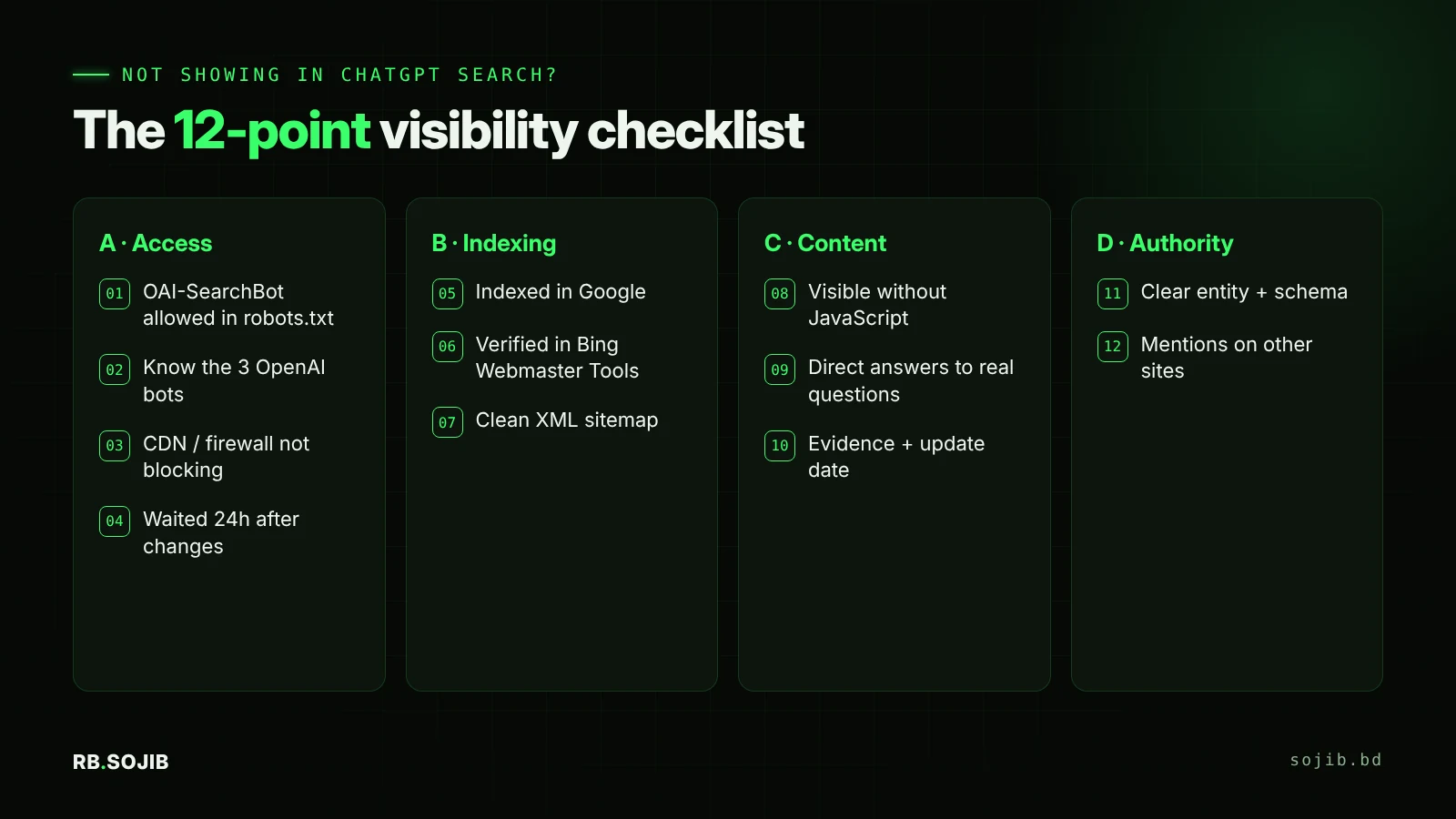
How does ChatGPT search find websites?
When ChatGPT searches the web, it sends sub-queries to its search sources, reads the pages that come back, and cites the ones it used. OpenAI runs a dedicated crawler, OAI-SearchBot, to build its own index. Independent research by Peec in September 2026 found that ChatGPT also draws on several outside providers, including Google results and Microsoft data. So you need to be reachable by OpenAI’s bot and well indexed in traditional search engines.
Part A: Access checks
1. Is OAI-SearchBot blocked in robots.txt?
Open yourdomain.com/robots.txt in your browser. Look for any rule that blocks OAI-SearchBot or a blanket User-agent: * with Disallow: /. A safe setup for search visibility looks like this:
User-agent: OAI-SearchBot
Allow: /

User-agent: PerplexityBot
Allow: /

# Optional: block AI training but keep search visibility
User-agent: GPTBot
Disallow: /

Sitemap: https://yourdomain.com/sitemap_index.xml
In WordPress with Rank Math, edit this under Rank Math › General Settings › Edit robots.txt.
Free, with a written report.
Get my free audit2. Do you understand the three OpenAI bots?
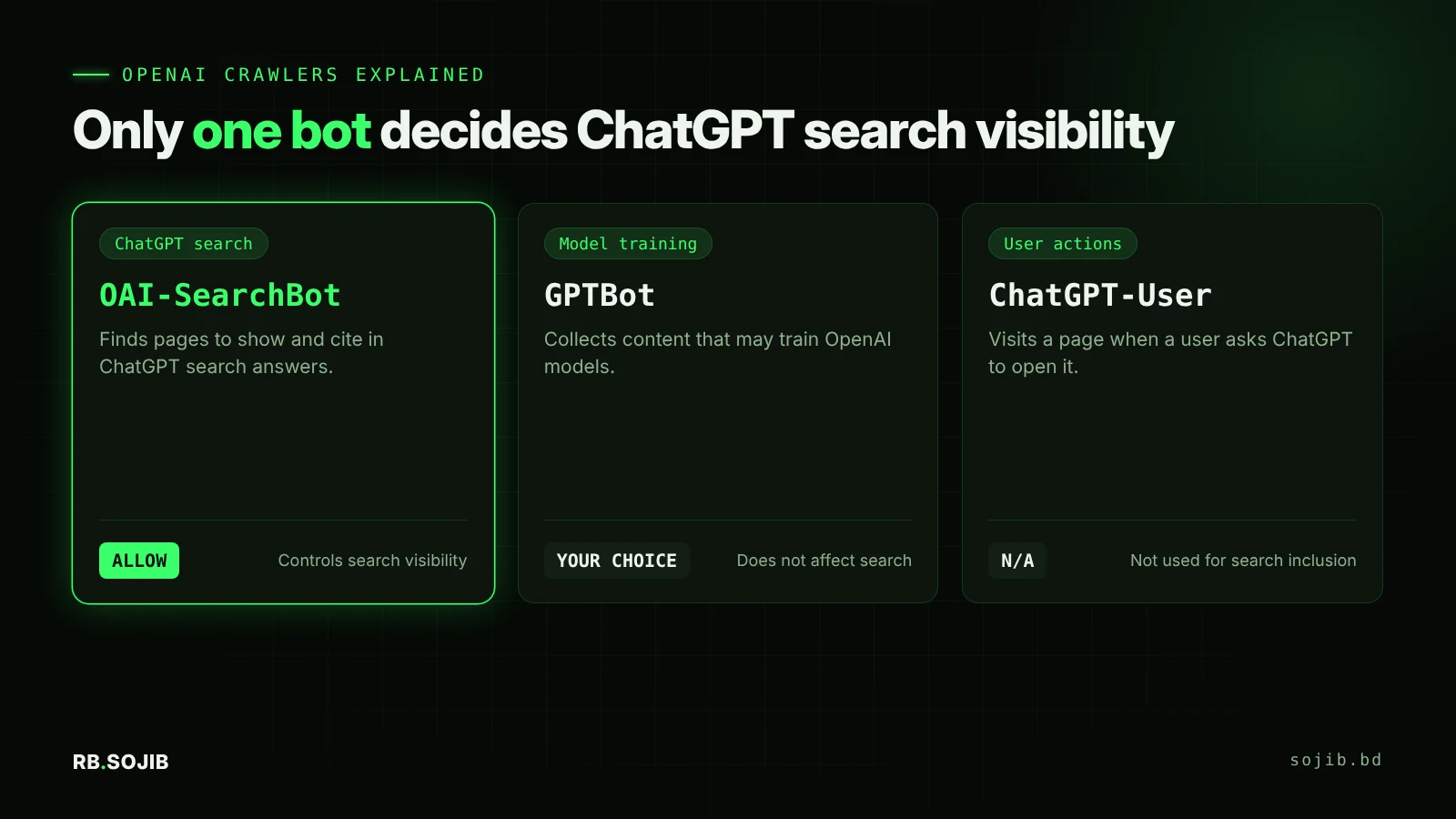
Many site owners block “all OpenAI bots” to protect content from training, and accidentally remove themselves from ChatGPT search. According to OpenAI’s crawler documentation, each bot is controlled separately. You can block GPTBot and still allow OAI-SearchBot.
3. Is your firewall, CDN or security plugin blocking AI bots?
Robots.txt can say “allow” while your firewall says “block”. Check Cloudflare’s bot settings (AI crawler blocking), Wordfence or similar plugins, and your hosting provider’s bot protection. OpenAI publishes OAI-SearchBot’s IP ranges at openai.com/searchbot.json so you can allowlist them.
4. Did you wait 24 hours after changes?
OpenAI notes that search-related robots.txt updates can take about 24 hours to take effect. Test again the next day before changing anything else.
Part B: Indexing checks
5. Is the page indexed in Google?
Search site:yourdomain.com/page-url or use URL Inspection in Google Search Console. If Google has not indexed the page, ChatGPT’s outside sources probably cannot see it either. Fix “Crawled, currently not indexed” pages with better content and internal links. My 10-point SEO audit covers this.
6. Is your site verified in Bing Webmaster Tools?
Verify your site at Bing Webmaster Tools (you can import from Search Console in two clicks), submit your sitemap, and enable IndexNow. Bing data also feeds Microsoft Copilot, and the new AI Performance report there shows how often AI answers cite you.
7. Is your sitemap clean and submitted?
Your XML sitemap should list only canonical, indexable URLs that return a 200 status. Remove redirected, noindex and thin tag or attachment pages.
Part C: Content checks
8. Is your main content visible without JavaScript?
Many crawlers read the raw HTML and may not run heavy scripts. If your prices, services or answers load inside sliders, tabs, popups or page builders that render late, the bot may see an empty page. Use “View page source” (not Inspect) and search for your key sentence. If it is missing, render it server-side.
9. Does the page answer a real question directly?
ChatGPT cites passages that answer the prompt. Put a 40 to 60 word direct answer under each question-style heading. Add a summary box, lists, tables and specific numbers. See the framework in What is Generative Engine Optimization (GEO)?
10. Does the page show evidence and freshness?
The Princeton GEO study found that adding statistics, quotations and cited sources significantly boosted visibility in AI answers. Add a visible update date, real data, and links to primary sources.
Part D: Authority checks
11. Is your brand clearly defined as an entity?
Use one consistent business name, address and description across your site, Google Business Profile, LinkedIn, Facebook and directories. Add Organization or LocalBusiness schema with sameAs links to your profiles. Details in schema markup for AI search.
12. Do other websites mention you?
ChatGPT is more likely to recommend a business that independent sources also mention: reviews, local directories, partner sites, podcasts, YouTube and industry roundups. If no one else talks about you, start with reviews and guest expertise in your niche.
How to test whether ChatGPT can see your site
- Check your server logs or hosting panel for visits from the
OAI-SearchBotuser agent. - In ChatGPT, turn on search and ask about a specific page topic using your brand name.
- Ask the questions your customers ask, without your brand name, and note which competitors are cited.
- Track GA4 referrals from
chatgpt.comeach month.
FAQ
Why is my website not showing up in ChatGPT?
Does blocking GPTBot remove my site from ChatGPT search?
How long does it take to appear in ChatGPT search?
Can I submit my website to ChatGPT?
Related posts
ChatGPT SEO for Roofers: How to Get Your Roofing Company Recommended by AI
12 min read
How to Make Your Roofer Website SEO Friendly (Local SEO Guide for NJ, CT, NH, MD & MA)
14 min read
What Is GEO? How to Optimize Your Website for ChatGPT, Gemini and Perplexity
9 min read