Google AI Mode Home Services Booking: A Complete Guide for Local Businesses

SEO Specialist
Google AI Mode Now Books Home Services Directly, Is Your Business Bookable?
On 4 November 2026, Google changed how home-service customers book, and if you work with US homeowners, you need to know about it. From that day, someone looking for a cleaner, a plumber or an electrician can ask Google AI Mode and book, or request a quote, right inside the answer. No directory in between. No website visit first.
I read the announcement and then spent the next few days checking what it actually takes for a business to show up there, because my clients were already asking me the same question: are we bookable yet? Here is the straight version. Google AI Mode home services booking runs through Angi, Thumbtack, Housecall Pro and Jobber, ServiceTitan is coming soon, and it only shows you if you have a paid subscription with one of them, a complete address, and a Google Business Profile connected at that same address.
Published 7 November 2026 · By RB Sojib · 7 min read · US only for now
Free, with a written report.
Get my free auditIn this guide to Google AI Mode home services booking: What changed on 4 November 2026 · Who powers the bookings? · The 3 requirements to appear · Step-by-step: get your business bookable in AI Mode · What if you are not in the US? · Why this is the biggest local-SEO shift of the week · 5 common mistakes · Readiness checklist · What clients say on Fiverr · Frequently asked questions · Sources and further reading
Want me to get your business bookable in AI Mode?
Free, with a written report.
Book a Free Call
What changed on 4 November 2026
Here is what actually changed. Google AI Mode home services booking is live, and it works the way you would hope it would, a US customer asks AI Mode for a cleaner or a plumber, Google shows a shortlist, and the customer can book or request a quote right there, inside the answer. No extra click to a directory. No phone call first. That is the shift that matters: the booking used to come after the website visit, and now it comes before it.
Google has not added a new ad format, and the technical bar is the same one it already gives for AI Overviews, be indexed, be eligible for a snippet. The new part is the partners. Only businesses connected through one of the partner platforms appear in that booking step at all. If you are not connected, you simply are not there. Read my full guide to how to rank in Google AI Overviews for the underlying rules, because the ranking work underneath is the same work.
Who powers the bookings?
Google AI Mode home services booking does not run on Google’s own booking, it reads the booking from its partners. So which partner you are on, and whether your profile is complete there, is the whole question. Four partners are live, Angi, Thumbtack, Housecall Pro and Jobber, and ServiceTitan is coming soon. My order, if I were doing it for a client this week, is simple: fix the Google Business Profile first, because that is the profile AI Mode reads first, and then get the partner subscription set up, without it, there is nothing for AI Mode to book through.
| Partner | What it does | Lead fees on AI Mode bookings |
|---|---|---|
| Angi | Home-service marketplace and booking | Check partner terms |
| Thumbtack | Local-service marketplace and booking | Check partner terms |
| Housecall Pro | Field-service software and booking | No lead fees confirmed |
| Jobber | Field-service software and booking | No lead fees confirmed |
| ServiceTitan | Field-service platform | Coming soon |
One thing worth knowing before you sign up: Jobber and Housecall Pro have confirmed there are no lead fees on these AI Mode bookings. You pay for the partner subscription, not per lead. That is the part people usually get wrong, they expect a per-lead charge like the old directories, and there is not one on those two. Angi and Thumbtack are different, so check their terms before you commit.
The 3 requirements to appear
Google lists three conditions. Miss one, and you cannot appear in the booking step:
- 1. A paid partner subscription, with Angi, Thumbtack, Housecall Pro or Jobber.
- 2. A complete address, your business address must be complete and accurate everywhere.
- 3. A connected Google Business Profile, at the same address, connected and verified.
US only for now. Do not promise AI Mode booking to clients outside the United States yet, Google has not rolled this out in the UK, Canada, Australia or Bangladesh.
Step-by-step: get your business bookable in AI Mode
Step 1 — Fix your Google Business Profile first


Verify your profile, confirm the exact business name, category, service area and address, add real photos, opening hours and services, and keep it updated. AI Mode reads this profile to decide who is real, local and bookable. A half-finished profile is the most common reason a good business stays invisible, I see it again and again. My local SEO service starts here for the same reason.
Step 2 — Pick one partner platform


Choose the partner your customers already use, Jobber or Housecall Pro if you run jobs and invoices there, Angi or Thumbtack if you already get leads there. Set up the paid subscription and complete your business profile inside that platform, with the same name, address and phone number (NAP) as your Google Business Profile. The mistake I see most here is signing up everywhere at once. Pick one, do it properly, and make sure the address matches your Google Business Profile exactly, that match is what lets AI Mode connect the two.
Step 3 — Match NAP everywhere

Name, address and phone number must match exactly across your website, Google Business Profile and partner platform. Even a small difference, “St” vs “Street”, a different suite number, can break the connection Google uses to link you to a booking. This is the most boring step in the whole guide, and the one that kills the most bookings. I check it on every profile audit because it is almost always wrong somewhere. My technical SEO audit checklist covers the crawl and consistency checks behind this.
Step 4 — Turn on booking and quote requests

Inside the partner platform, enable booking and quote requests, set your services, service area and availability, and test the flow yourself. If a customer cannot complete a booking in two taps, fix it before you promote it. [Note for RB: add a line here about a test booking you have run yourself, if you have one.]

Step 5 — Test it like a customer
Test Google AI Mode home services booking the way your customer would, search in Google AI Mode for “book a house cleaner near me this week”, and see whether your business appears with a booking link. Check on mobile first: most home-service searches happen on a phone. If it does not work, check the address match first. That is where it breaks most often.
Step 6 — Keep reviews and response time strong
AI Mode favours businesses customers trust. Ask happy customers for a Google review, reply to every review, and answer quote requests fast. A business with fresh reviews and fast replies will win the booking over a cheaper competitor with none. This is the cheapest win in the whole guide, and the one most businesses skip.
Step 7 — Track it every month

Run the same buyer prompts in Google AI Mode every month, the same searches your customers use, and write down whether you appear, whether the booking link works, and how many bookings and quote requests came through. If you do not write it down, you will never know whether any of this is working. That is the same monthly tracking I use in how to get AI to recommend your business.
What if you are not in the US?
Right now this is US only, so if you are outside the US, you cannot be booked through AI Mode yet. Do the same preparation now, so you are ready on day one: clean up your Google Business Profile, fix NAP everywhere, collect reviews, and get listed on the partner platforms that operate in your country. When Google expands AI Mode booking, the businesses that are already clean and connected will appear first. That is exactly what I would do if I were waiting for this to launch in my own market.
Why this is the biggest local-SEO shift of the week
I have spent years trying to get clients to #1. Here is what changed this week: with Google AI Mode home services booking, the click itself is moving inside the AI answer. A business can rank well in organic search and still lose the job if it is not bookable in AI Mode, because the customer books before they ever visit a website. Local SEO is no longer just visibility. It is visibility + trust + bookability, in one answer. That is the same shift what is GEO? describes for AI answers in general: SEO gets you ranked, GEO gets you quoted, and now, booked.
5 common mistakes that keep you out of Google AI Mode home services booking
- Mismatched NAP, different name, address or phone on your website, Google Business Profile and partner platform.
- Incomplete Google Business Profile, missing services, hours, photos or service area.
- No partner platform, waiting for Google to list you directly; booking only runs through Angi, Thumbtack, Housecall Pro or Jobber.
- No recent reviews, AI favours businesses customers trust right now, not three years ago.
- Slow replies, quote requests answered hours later lose to a competitor who replies in minutes.
Tested live: an AI assistant booking a client's business
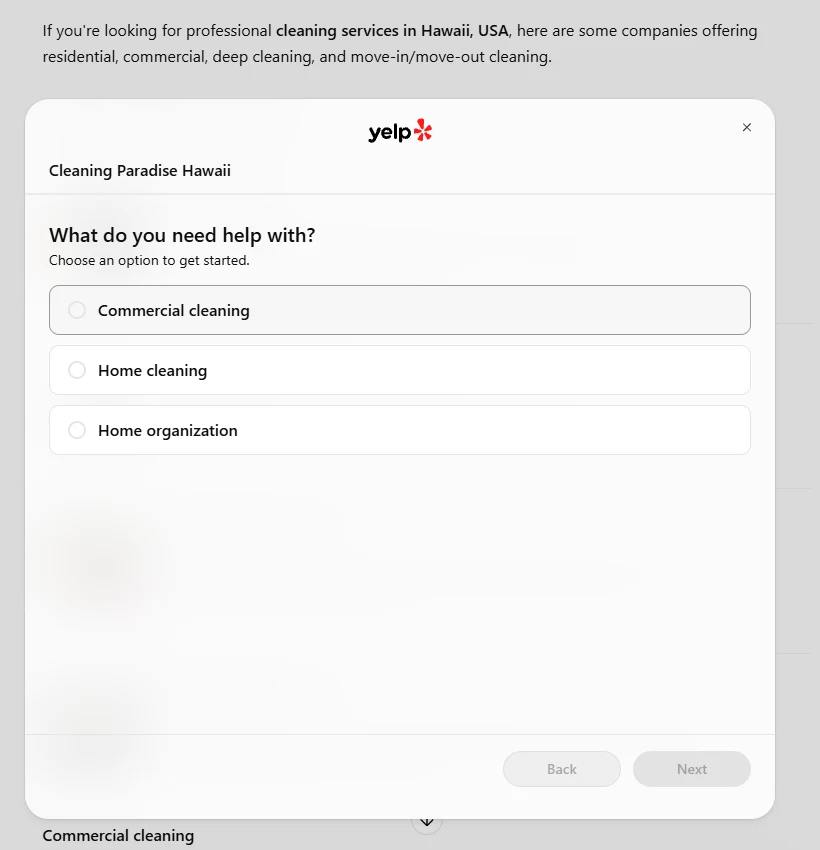
AI booking is not only happening in Google. In this November 2026 test, ChatGPT opened Yelp's request-a-quote flow for my client Cleaning Paradise Hawaii inside the chat. It asked which service the customer needed before collecting contact details, without the customer visiting a website. The groundwork is the same one that makes a business bookable in Google AI Mode: a complete profile, accurate services and a connected booking partner.
Want this done for you? My Google AI Mode booking setup service connects your profile and booking partner, then tests the flow before launch.
Readiness checklist
- Google Business Profile verified, complete, same address everywhere
- Partner subscription active (Angi / Thumbtack / Housecall Pro / Jobber)
- NAP identical on website, Google Business Profile and partner
- Booking and quote requests enabled and tested
- Services, service area and availability set
- 5+ recent Google reviews, replies to all
- Test search in AI Mode on mobile, booking completes in two taps
What clients say on Fiverr
Verified reviews from my Fiverr profile: 4.9 out of 5 from 168 client reviews (fiverr.com/rbsojib, verified 7 November 2026), 164 five-star, 2 four-star, 1 three-star, 1 one-star. Communication 4.9, quality of delivery 4.9, value 5.0. Response time about 1 hour. See all reviews: fiverr.com/rbsojib
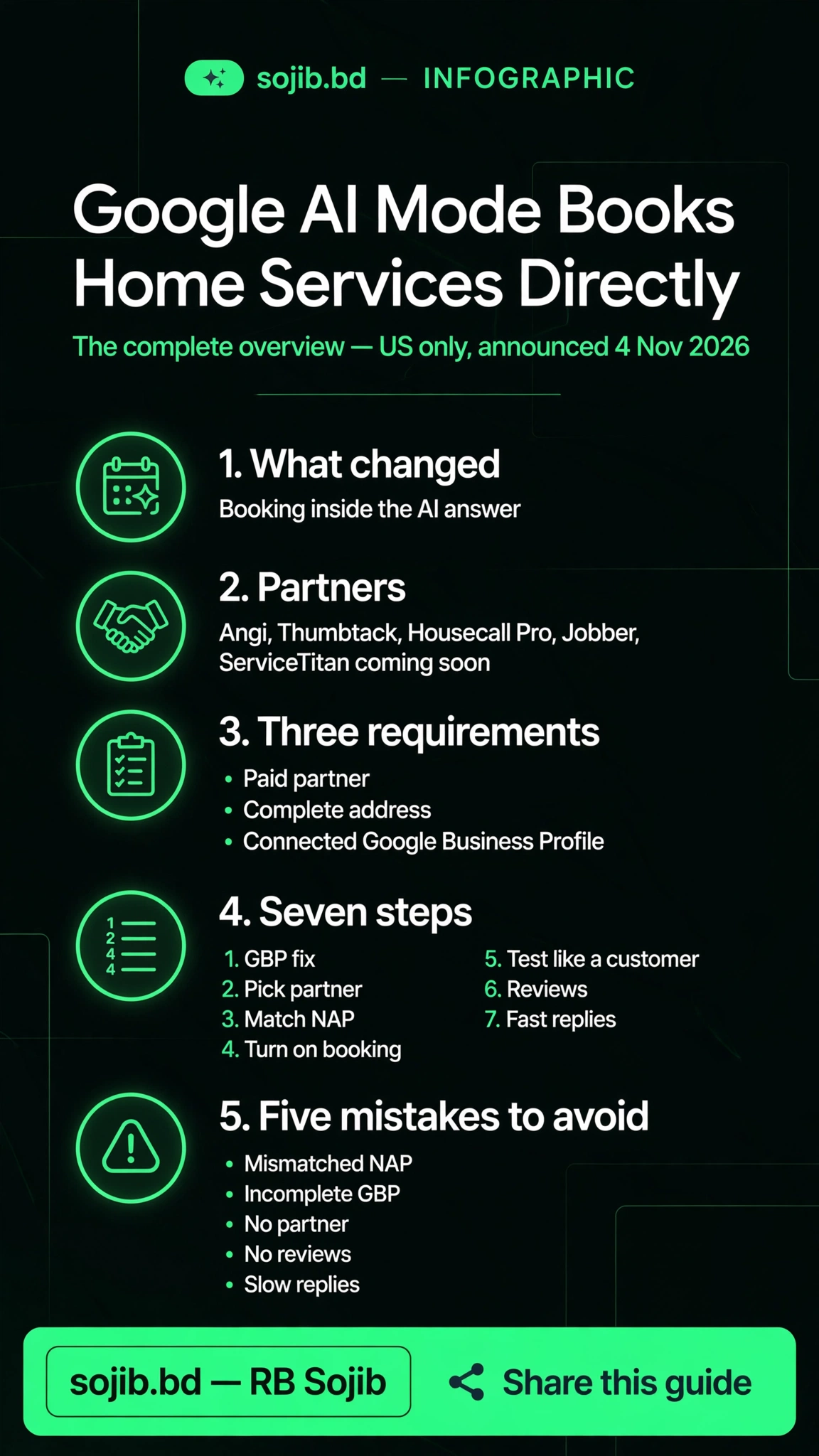
Share this guide, complete overview infographic
The whole guide in one image, Google AI Mode home services booking: what changed, partners, 3 requirements, 7 steps and 5 mistakes. Share it on LinkedIn, Facebook or X, link back to this post.
Frequently asked questions
Is Google AI Mode booking available outside the US?
No, Google AI Mode home services booking is US only for now. Google has not announced a date for the UK, Canada, Australia or other countries.
Do I have to pay per lead to appear?
Google AI Mode home services booking has no per-lead fee on Jobber and Housecall Pro, both confirmed no lead fees on AI Mode bookings. You need a paid partner subscription, but the booking itself does not carry a lead fee on those two platforms. Check the current terms on Angi and Thumbtack.
Do I still need a website?
Yes. Your website still proves you are real, shows your work and prices, and wins the customers who want to check before they book. AI Mode booking adds a shortcut, it does not replace your website. My on-page SEO checklist covers what that website page still has to do.
What is the first thing I should fix today?
Your Google Business Profile. Verify it, complete every field, match your address exactly, and add fresh photos and reviews. That one profile is the key to AI Mode, Google Maps and local search, all at once.
Which partners power AI Mode booking?
Angi, Thumbtack, Housecall Pro and Jobber power Google AI Mode home services booking; ServiceTitan is coming soon.
Sources and further reading
That is the whole guide. If you would rather I did this for you, I help local and service businesses get found, and now booked, with Google AI Mode home services booking. See my AI Mode Booking Setup service, or book a free call.
Written by RB Sojib, SEO expert in Bangladesh with 7+ years of hands-on work on technical, on-page and AI search optimization for businesses in the USA, UK, Europe and Australia. I test these steps on client sites and my own, and track the results across ChatGPT, Gemini and Perplexity every month.