How to Rank in Google AI Overviews in 2026: A Practical SEO Guide

SEO Specialist
- Google says AI Overviews need no special markup, files or schema. Standard SEO eligibility applies.
- AI Overviews reached about 2 billion monthly users, so being cited there is now prime visibility.
- Query fan-out means Google searches several sub-topics. Cover them on one page or a tight topic cluster.
- Clear passages, evidence, freshness and page experience decide which pages get linked.
- Track results in Search Console’s normal Performance report under the Web search type.
What are Google AI Overviews?
AI Overviews are AI-generated summaries that appear at the top of some Google search results, with links to the web pages used to build the answer. They are powered by Gemini models. Google reported AI Overviews at about 2 billion monthly users in 200 countries and territories (TechCrunch). AI Mode is the full conversational version, and Google reported it passed 1 billion monthly users in 2026.
AI Overviews do not show for every search. Google says they appear only when they add value beyond classic results, so they are most common on informational and “how to” questions.
How Google chooses pages for AI Overviews
According to Google’s own AI features documentation:
Free, with a written report.
Get my free audit- Eligibility: the page must be indexed and eligible to appear in Search with a snippet. There are no additional technical requirements.
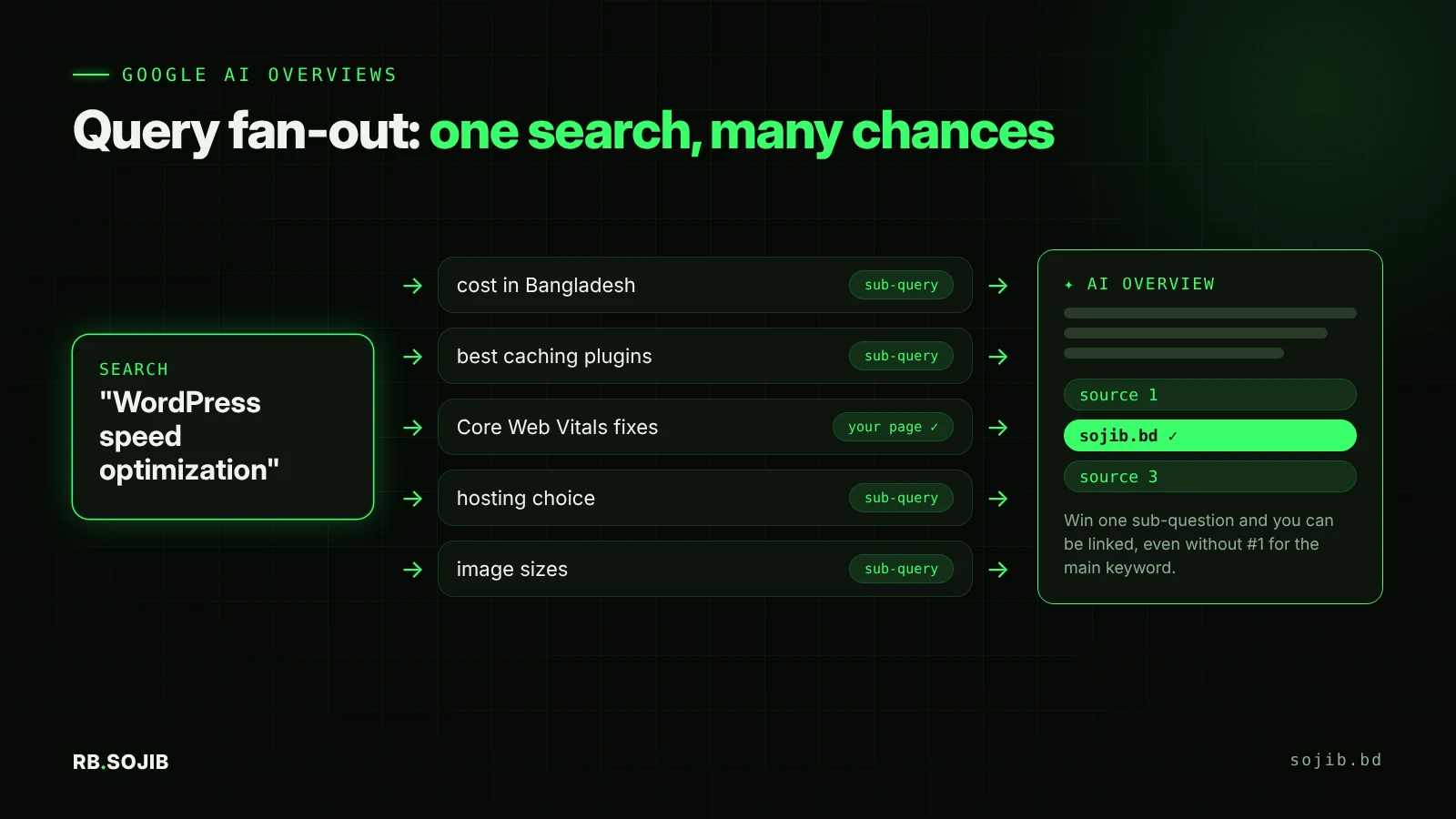
- Query fan-out: AI Overviews and AI Mode may run several related searches across subtopics, which can surface a wider and more varied set of pages than classic results.
- No special files: you do not need new machine-readable files, AI text files or special schema.
That second point is your opportunity. You don’t have to rank #1 for the main keyword. If your page gives the best answer to one of the sub-questions, it can be linked.
9 steps to rank in Google AI Overviews in 2026
1. Make sure the page can show a snippet
Check URL Inspection in Search Console: the page must be indexed. Remove any nosnippet tag or a very small max-snippet value, since Google uses these as controls for AI features too. Make sure robots.txt and your CDN allow Googlebot.
2. Map the fan-out questions
For your target keyword, list the follow-up questions a searcher would ask. Use “People also ask”, Google’s autocomplete, AI Mode’s suggested follow-ups and your own sales calls. For “WordPress speed optimization”, fan-out questions include cost, best plugins, Core Web Vitals, hosting and image sizes.
3. Write answer blocks
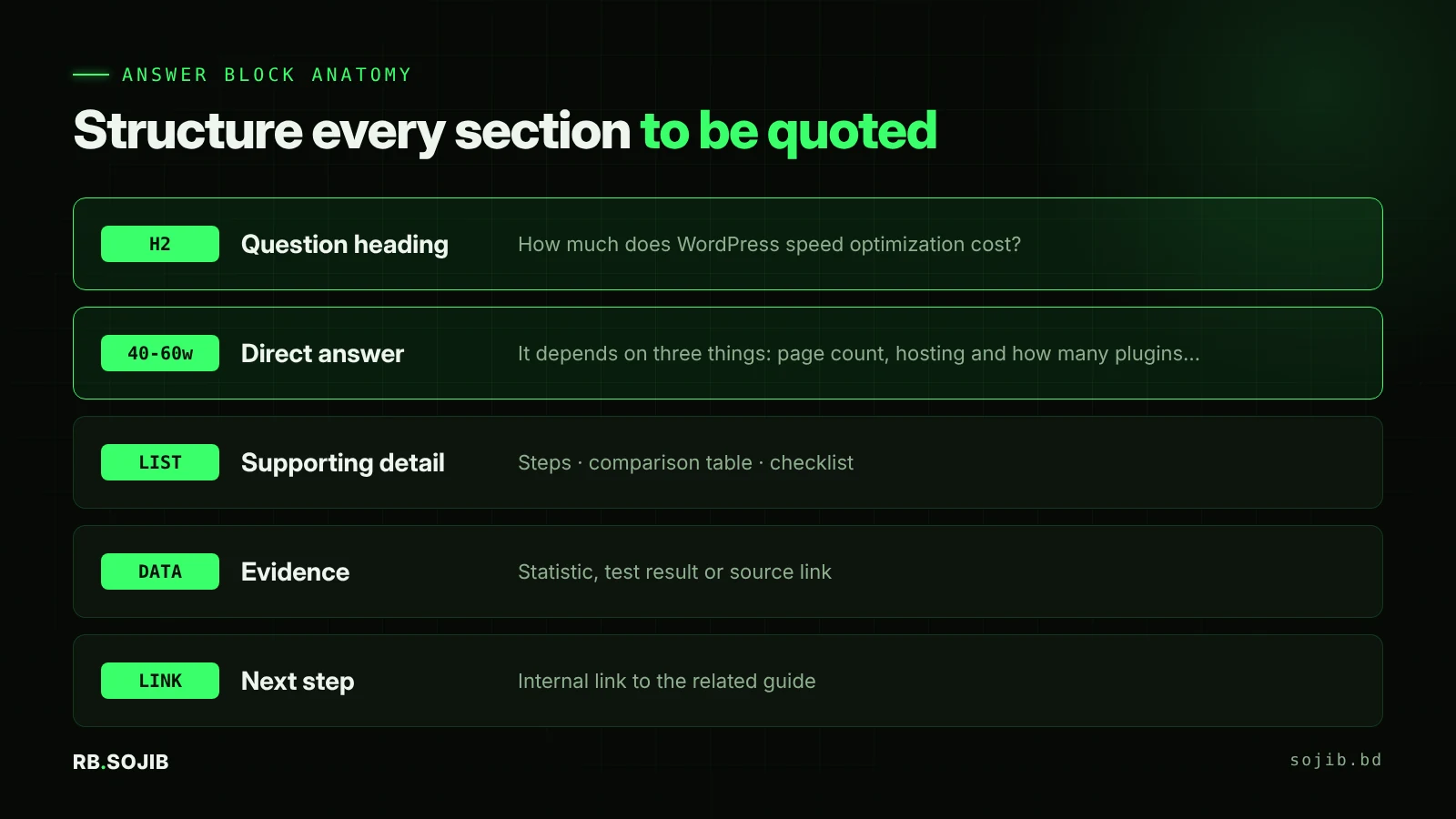
Each block starts with a question-style H2 or H3, followed by a direct 40 to 60 word answer, then supporting detail in a list or table, then evidence. This is the same pattern I use for Generative Engine Optimization, because the same clarity helps Gemini, ChatGPT and Perplexity.
4. Add information gain
Google’s systems have already read the generic version of your topic many times. Add what others don’t have: your own data, screenshots, prices in your market, before-and-after results, local examples, or a clear opinion based on experience. Research on generative engines found statistics, quotations and cited sources significantly raise visibility (GEO study, KDD 2024).
5. Show E-E-A-T clearly
- A named author with a bio, photo and links to profiles.
- An “About” page that explains your real experience.
- Citations to primary sources, such as official documentation.
- Accurate
Article,PersonandOrganizationschema that matches the page. More in schema markup for AI search.
6. Build a topic cluster with internal links
Google recommends making content easy to find through internal links. Link a main guide to supporting posts and back again. This helps Google understand that you cover the whole topic, which matters when fan-out searches several sub-topics. See my guide to internal linking that boosts rankings.
7. Keep important content in text
Google advises keeping important content in textual form. Don’t put key answers only in images, videos or PDFs. Support text with good images and video, and add descriptive alt text.
8. Improve page experience
Fast, stable, mobile-friendly pages are part of Google’s guidance. On WordPress, compress images to WebP, remove unused plugins, and fix layout shift. My guide on making Elementor pages load under 1 second covers the details.
9. Update regularly
Refresh statistics, screenshots and examples every 3 to 6 months, and show a visible “Updated” date. AI answers on fast-changing topics favour current information.
How to track AI Overview performance
- Search Console: AI Overviews and AI Mode traffic is included in the Performance report under the Web search type. Watch pages whose impressions rise while average position stays stable.
- Manual checks: search your top 20 questions monthly and record whether your page is linked in the AI Overview.
- GA4: compare engagement and conversions. Google says clicks from pages with AI Overviews tend to be higher quality.
AI Overview mistakes to avoid
- Writing long introductions before the answer.
- Publishing generic AI-generated text with no original insight.
- Blocking snippets with
nosnippetand then wondering why you are not cited. - Chasing every keyword with separate thin pages instead of one strong cluster.
- Buying “AI Overview ranking” services that promise guaranteed placement. No one can guarantee it.
FAQ
How do I get my website in Google AI Overviews?
Do I need schema to appear in AI Overviews?
Can I opt out of AI Overviews?
Do I need to rank #1 to appear in an AI Overview?
Related posts

ChatGPT SEO for Roofers: How to Get Your Roofing Company Recommended by AI
12 min read

How to Make Your Roofer Website SEO Friendly (Local SEO Guide for NJ, CT, NH, MD & MA)
14 min read
What Is GEO? How to Optimize Your Website for ChatGPT, Gemini and Perplexity
9 min read